
Complete the Collection
Unlock the Collection to see which units, items, Cores and enemies you still need. Check it between battles so you can pick the right promotion, machine or battlefield before you spend resources.
Open the Collection
Section titled “Open the Collection”- Between runs, buy Sigil of Unsealing for 1 Originite and then Collection for 3 more.
- During a run, select Collection on the right side of the battlefield. The default shortcuts are C on keyboard and View on gamepad. You can open it while choosing a class promotion.
- Select a unit class and use the page arrows to browse. Use the flag beside the arrows to view units by faction. As of 1.0.4 (1), select the X on the faction plate, press Esc, or press controller B to go back.
Record both unit promotion branches
Section titled “Record both unit promotion branches”For Every Soldier, compare your Collection with the Units database to find the grades and forms you still need. Before your next run, check the required clear and how much Originite to save for that rarity unlock.
Look for silhouettes with ??? in the name and promotion path. These are entries you still need to record. A visible unit can still have unknown promotions, as Fighter does on the recorded save.
When a unit offers two promotion choices, pick the missing branch. Then keep leveling that unit until you record its three-star form. Grow another unit from the same starting form for the other branch. The rightmost unit-class tab has all five Jester forms on one page.
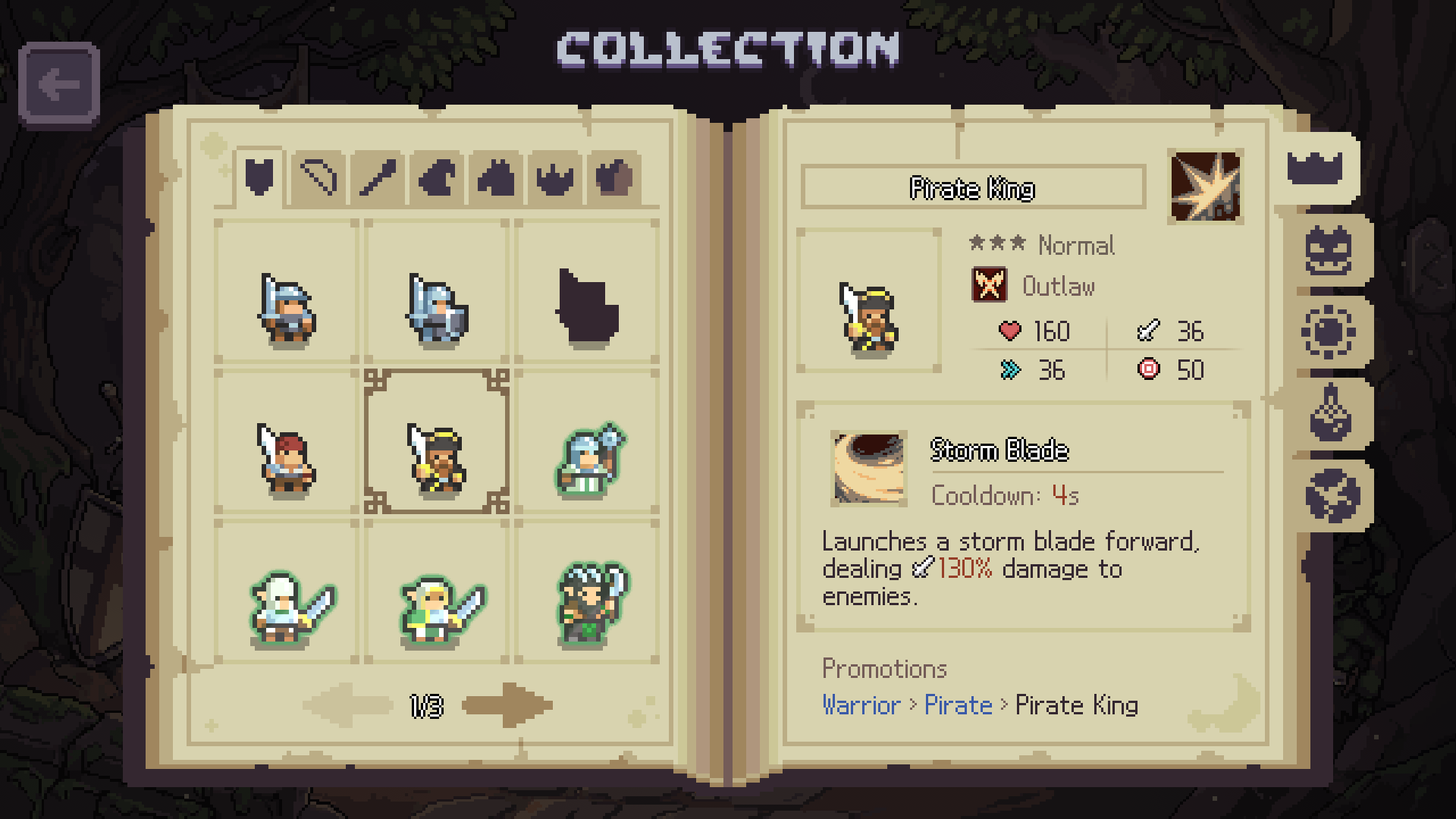
For example, when a Warrior reaches level 5, pick Pirate. Raise the Pirate to level 12, then choose Pirate King when that promotion appears. The screenshot above shows that branch on page 1 of the Warrior tab. Use another Warrior to record the Soldier branch.
In the Archer tab, page 2 shows Grenadier beside Demolitionist. Absorb units to raise Grenadier to level 18, then choose Demolitionist when that promotion appears.
On the first Mage page, a Normal Mage can become a Shaman or Healer. To record Elf Sage, start with an Advanced Sorcerer and choose Elf Mage at its first promotion.
After buying Legendary Unlock, raise a Skeleton Archer to level 10 and choose the missing next promotion. Dark Archer and Illusion Archer each have their own entry. Raise Illusion Archer to level 20, then choose Mirage when that promotion appears.
If you’re hunting for Prism units, check the Prism unlock. A targeted jackpot gives you another way to pursue a missing class.
Check the battlefield before shopping
Section titled “Check the battlefield before shopping”For Item Collector, expand the missing item in the Items database and check Battlefield and How to unlock. Choose a battlefield in the filter to see which items are exclusive to it. Buy any required upgrade between runs.
Try Normal or Hard when looking for a Legend item so you can check later Shop refreshes. Keep a slot free and save enough Essence to buy the item when it appears. Check the Collection after the purchase before spending more on the same item.
Find the nine Legend items
Section titled “Find the nine Legend items”Take 10 Essence into the later Shop refreshes. Snipper’s achievement guide reports Legend offers from wave 15. Six belong to specific battlefields.
| Battlefield | Legend item |
|---|---|
| Open Forest | Guardian Golem |
| Deep Cave | Retaliation Sigil |
| Wasteland | Wasteland Camel |
| Lost Ruins | Drowned Scepter |
| Crimson Hell | Blast Shield |
| Split Space | Rift Star |
Necklace of Unity can appear on any battlefield. Burning Heart and Peddler’s Pack can also appear anywhere once you buy their upgrades after clearing Lost Ruins on Normal.
Switch machines for missing Cores
Section titled “Switch machines for missing Cores”For Core Collector, filter the Cores database by Machine. Eight Cores are exclusive to Nudge and eight to Blast. Clear Deep Cave on Normal and buy Blast Slot Machine Unlock to start finding the Blast set.
Check each missing Core for an unlock requirement. If an upgrade is listed, buy it to add that Core to the reward pool. Choose it when offered and check whether it is recorded. Core Reroll gives you a free reroll each run.
Joker’s Grin and Golden Lever can appear once you can summon a grade above Normal. Echo Shell requires a compatible Core already equipped. In 1.0.4, its extra use works with Rebound Axis and Cycle Bell.
Revisit campaign enemies on Hard
Section titled “Revisit campaign enemies on Hard”For Know Your Enemy, check the Enemy database for the missing enemy’s battlefield. Open that battlefield’s wave list and choose a difficulty that includes the encounter. Hard reaches wave 30 and includes the third boss.
Some ordinary waves have alternate enemy groups. If a target is still missing after a clear, replay a battlefield and difficulty where that enemy can appear. The achievement counts campaign enemies.
Sources
Optima Arch documents the battlefield button, the shortcut during promotions and the faction filter. 1.0.0 (8) update · 1.0.3 update · Publisher’s Collection screenshot
rekvizit8bit’s 1.0.3 Collection recording
Steam achievements give the four completion targets. Snipper’s achievement guide describes hunting entries across runs.
Check the 1.0.3 upgrade tree, item cards, Core cards and battlefield list for unlocks and availability. The Echo Shell fix is in Optima Arch’s 1.0.4 update.
- Slotbound 1.0.4 (1) hotfix — Documentation · accessed-2026-11-26
- Steam achievement list — Documentation · accessed-2026-11-23
- Steam achievements in Simplified Chinese — Documentation · accessed-2026-11-23
- Slotbound 1.0.3 update — Documentation · accessed-2026-11-22
- Slotbound 1.0.0 (8) update — Documentation · accessed-2026-11-22
- Pirate King in the Collection — Observed in-game · press-kit-collection-reviewed-2026-11-23
- rekvizit8bit’s 1.0.3 Deep Cave clear and Collection — Observed in-game · 1.0.3-stream-verified-2026-11-23
- Slotbound.net permanent upgrades — Documentation · 1.0.3-data-2026-11-23
- Slotbound.net unit roster — Documentation · 1.0.3-data-2026-11-23
- Slotbound 1.0.4 update — Documentation · accessed-2026-11-24
- Slotbound.net promotion levels — Documentation · 1.0.3-data-2026-11-23
- Slotbound.net item catalog — Documentation · 1.0.3-data-2026-11-23
- Slotbound.net Core catalog — Documentation · 1.0.3-data-2026-11-23
- Slotbound.net battlefields — Documentation · 1.0.3-data-2026-11-23
- Snipper’s Collection achievement guide — Documentation · guide-updated-2026-11-22
- BeztTopEU’s 1.0.3 Wasteland and Lost Ruins runs — Observed in-game · 1.0.3-stream-verified-2026-11-23
- BeztTopEU’s 1.0.3 Open Forest to Wasteland runs — Observed in-game · 1.0.3-stream-verified-2026-11-23
Unofficial fan wiki, independent of Optima Arch. Game content belongs to its owners.
Comments & feedback
Share a tip or suggest a correction. Comments are public. Guest names are unverified; verified accounts show their public name. All language pages share this discussion. Please keep personal information private.