
BBWinRate: download, install and use
BBWinRate shows an experimental combat estimate below each army count. It uses a simplified battle model. A high percentage does not guarantee that your company will win or survive.
Version 0.3.1 targets Battle Brothers PC 1.5.2.3 and needs Modern Hooks exactly 0.6.0. You do not need Python, MSU, Combat Simulator or Autopilot. Compatibility with other game builds, Legends, Reforged and other mod combinations is unknown. Back up your saves and try a separate test campaign first.
Hidden-enemy spoiler: the estimate includes all living combatants, even enemies you have not discovered. There is no visible-enemies-only option. Leave the mod uninstalled if you want to avoid this information.
Download and install
Section titled “Download and install”- Close the game and back up your saves.
- Download Modern Hooks 0.6.0 from its official release page. Choose
mod_modern_hooks-0.6.0.zip, not a “Source code” archive. Follow the author’s installation instructions. Do not remove libraries other mods still need or change their required versions blindly. - Open the BBWinRate Nexus Files page and download BBWinRate 0.3.1, the player file
mod_bbwinrate-0.3.1.zip. Modern Hooks is a separate download. - Find your game installation folder. In Steam, use Battle Brothers → Manage → Browse local files, then open
data. This is different from the Documents folder that holds saves and logs. - Put both mod ZIPs in
<Battle Brothers>/data/without extracting them. Keep only one BBWinRate ZIP there; move any older copy elsewhere. Leave game archives, the executable and unrelated mods alone. - Start the game and enter a battle in your test campaign. The overlay appears automatically below the army counts.
Use help and display controls
Section titled “Use help and display controls”Click either estimate or the small BBWinRate button in battle to open help. Hover or focus an estimate for a summary; Enter or Space also opens help when the estimate is focused.
- Hide/Show estimates controls whether the readings are visible. To remove the mod completely, close the game and move its ZIP out of
data. - Compact/full display changes the panel size.
- Retry estimate checks the current battle inputs and calculates again. It cannot add support for a missing mechanic.
These display preferences last for the current game session. Help absorbs native battle shortcuts while open; Escape closes help without also opening the battle menu.
Read the overlay
Section titled “Read the overlay”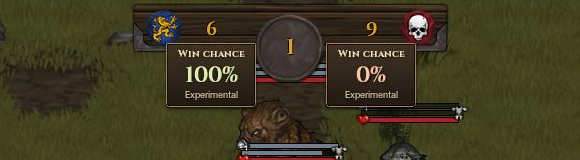
The screenshot uses Win chance and Experimental labels. The 0.3.1 instructions call the reading Battle estimate; use the status and hover details below to interpret it.
| Display | What to do |
|---|---|
| Approximate | The model can sample the encounter using supported attacks. The enemy reading is 100% minus yours, not a separate prediction. |
| Limited estimate | Some abilities are omitted, or samples stopped early or reached the calculation budget. Hover for the specific limitation. |
| Waiting | The current action, movement or follow-up effects have not settled; the previous percentage is hidden. Let battle actions finish. |
| Calculating | The model is sampling a new battle state. Let it finish. |
| Unavailable | The whole encounter cannot be estimated. Hover for the reason and open help for the next step; this does not mean a 0% chance. |
80% does not mean you will win 80 out of 100 similar real battles. The percentages have not been calibrated against real outcomes. The model simplifies movement and distance, does not reproduce the game’s AI, and leaves out cover, many skills and other mechanics. Some armies or battles involving several factions cannot be handled.
An unsupported required fighter or weapon can make the whole encounter Unavailable. So can decisive abilities such as resurrection, undead possession, charm/hex, sleep/nightmare, shaman roots/insects and priest horror/miasma, even when that actor also has a supported basic attack. More than 64 combatants, unsupported faction relationships or a connection problem can also prevent an estimate.
More simulated fights cannot fix missing mechanics. Use your judgment about terrain, abilities and retreat; do not risk a valued campaign just because the number is high. For the game’s actual rules, see combat basics.
Troubleshoot
Section titled “Troubleshoot”| Problem | Check |
|---|---|
| No overlay | Check in help that estimates are not hidden. Then confirm game 1.5.2.3, Modern Hooks 0.6.0, and one unextracted BBWinRate ZIP in the game’s data folder. Check the log for dependency errors. |
| Unavailable | Hover and record the exact reason. For a connection or snapshot problem, try Retry estimate in help; it cannot make an unsupported weapon or ability supported. |
| Calculating or Waiting persists | Wait until actions and movement stop. If the battle is idle but no result arrives, try Retry estimate in help, then record the delay and hover details. |
| The number looks wrong | Record the armies, weapons, skills and situation. An apparently precise percentage can still be a poor estimate. |
| A conflict with another mod | Record all mod versions. Try a minimal setup only in a separate test campaign. Do not remove campaign-changing mods from your only save. |
On Windows, the game log is usually Documents\Battle Brothers\log.html. Copy it before restarting the game, because a new launch overwrites it. Open the copy in a browser or text editor and look for BBWR1, BBWinRate and nearby error lines. If Documents has been redirected, check its actual location.
More technical developer data is under Advanced diagnostics in help. The mod makes no automatic network requests or report submissions; review combat and mod information in any logs or captures before sharing them.
Update, roll back or uninstall
Section titled “Update, roll back or uninstall”Close the game, then move the BBWinRate ZIP out of data. To update or roll back, put just one replacement BBWinRate ZIP there. To uninstall, leave it out. Keep Modern Hooks if other mods need it.
You do not need to convert or restore a save to change this mod. Changing versions does not undo campaign progress. Keep your backups separate; do not overwrite a newer save just to switch versions.
Report a problem
Section titled “Report a problem”Start with Copy problem report in help. It prepares a concise report locally without unit snapshots, unit names or personal paths. If direct copying is unavailable, the text is selected for Ctrl+C. Paste it yourself into the Nexus bug-report page or Posts discussion, and add reproduction steps. You can also use this short template:
BBWinRate / game / Modern Hooks versions:Other mods and versions:Steps to reproduce:Expected result / what happened:Army sizes, enemy types and relevant weapons or skills:Screenshot of the overlay and hover details:Relevant log lines and approximate time:Check images and logs for personal paths or account names before sharing. Share relevant log lines rather than your whole save folder. Only provide a save if requested and after checking its contents.
Sources
BBWinRate 0.3.1 author description and Files page, checked October 27, 2026 · Modern Hooks 0.6.0 and author’s Nexus page · Overhype’s log and bug-report instructions.
Combat screenshot supplied by the player; also in the BBWinRate Nexus gallery. Cover art by Overhype Studios; see the official Battle Brothers Steam listing.
Unofficial fan wiki, not affiliated with Overhype Studios. Game content belongs to its owners.
Comments & feedback
Share a tip or suggest a correction. Comments are public. Guest names are unverified; verified accounts show their account username. All language pages share this discussion. Please keep personal information private.