
 Order of the Sinking Star
Stone crossings
Guide the  Warrior across four islands by setting stones S1, S2 and S3 on the purple targets B1, B2 and B3. A moving stone skips over water until it reaches land or meets a wall. When it sinks at a B target, it becomes fixed footing and stays there.
Each arrow is one directional input. The complete route marks twelve stone launches with a wait cue. After a launch, release the direction and wait until the stone stops before entering the next input; the cue is not a timed pause.
Warrior: build three crossings
Section titled “Warrior: build three crossings”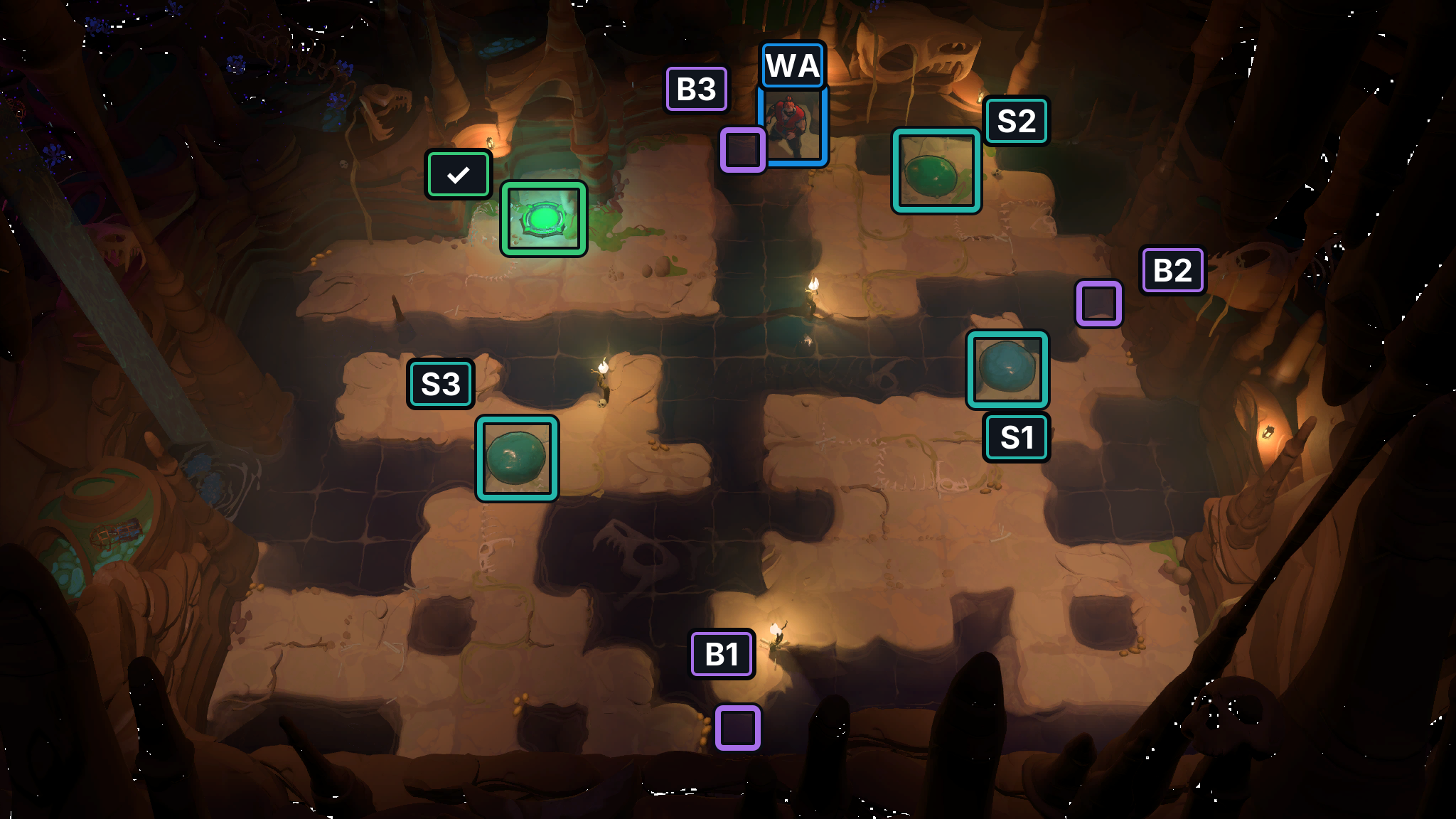
- Stones S1–S3
- Bridge targets B1–B3
- Exit
- WA Warrior
Selected video state — 158 seconds
Section titled “Selected video state — 158 seconds”This video frame shows a selected state, not a confirmed start or finish; the model route below remains separate.
Selected source state only; it does not verify the separate model route below.
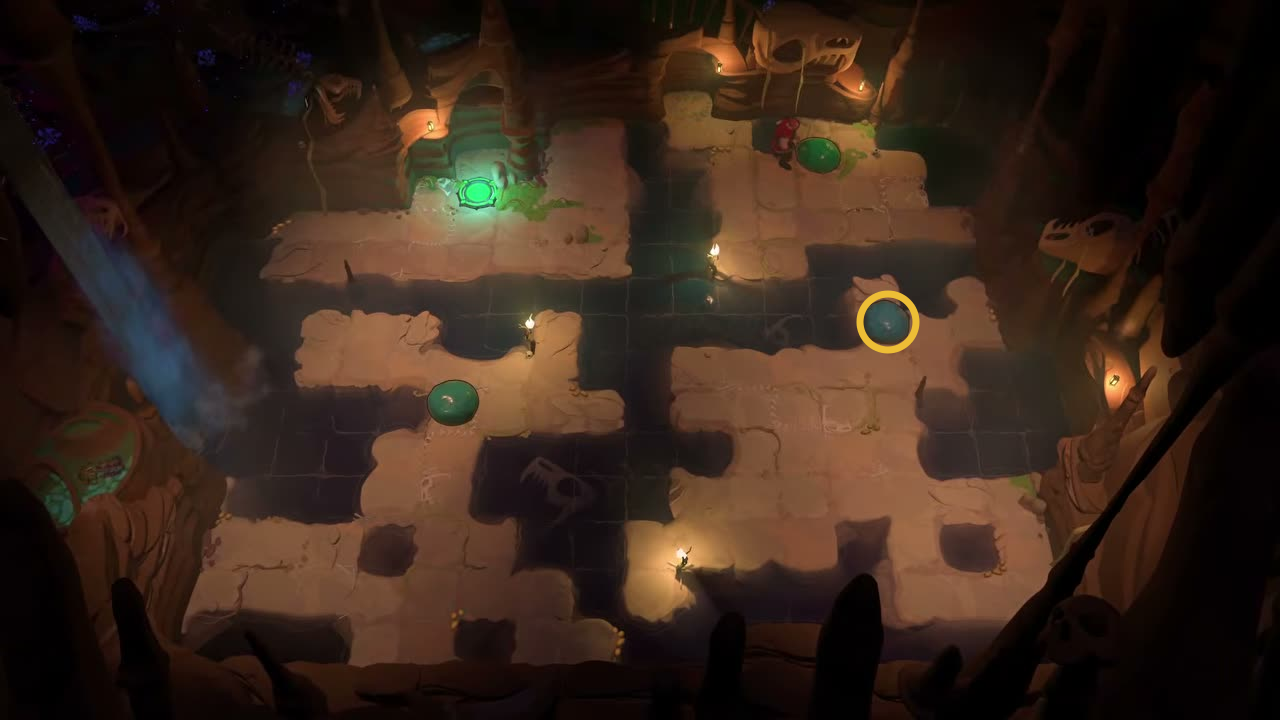
Give each skipping stone a stopper.
Check: Ring marks round skipping stone on the eastern island.
Open full-size image in a new tabHint
Set S2, S1 and S3 on B2, B1 and B3 in that order. Many launches stop on intermediate islands; those landings are expected. Wait after every launch, and check the named stone only at its B-target checkpoint. Once a stone sinks onto a target, it remains there as a foothold.
Solution
- S2 settles on B2 at step 18, making the first bridge.
- Route S1 across the islands and onto B1 at step 97, then bring S3 toward B3.
- S3 settles on B3 at step 174. Cross the completed route; the Warrior reaches the exit at step 205.
The direction list shows “Wait until the stone stops.” after each launch. Intermediate island landings are part of the route. At the three target checkpoints, confirm S2 on B2 (18), S1 on B1 (97) and S3 on B3 (174). If a stone misses its target at one of those checkpoints, Undo to before that launch and realign it. Once it sinks on B1, B2 or B3, leave it as fixed footing.
Full direction sequence
- Steps 1–18 · WA Warrior
→ ↓ → → ↑ → ↓ → ↓ ← ← ↑ ← ↓ ↓ ← ↓ →Wait until the stone stops.
- Steps 19–31 · WA Warrior
↑ → → → → ↓ ↓ ↓ ← ↓ ← ↑ ↑Wait until the stone stops.
- Steps 32–42 · WA Warrior
↓ → → ↑ ↑ ↑ ← ← ↑ ← ↓Wait until the stone stops.
- Steps 43–60 · WA Warrior
→ → → ↓ ↓ ↓ ← ← ↓ ↓ ← ← ↑ → → ↑ → ↓Wait until the stone stops.
- Steps 61–88 · WA Warrior
← ↓ ↓ ↓ ↓ ↓ → → ↑ ↑ ← ← ↑ ← ← ↓ → ↑ → ↓ ↓ ↑ → → ↓ ↓ ← ←Wait until the stone stops.
- Steps 89–97 · WA Warrior
↑ ↑ ← ← ← ← ↓ ← ↓Wait until the stone stops.
- Steps 98–114 · WA Warrior
↓ ← ← ↑ ← ↑ ← ↑ ↑ ↑ → ↑ ← ← ↑ ← ↓Wait until the stone stops.
- Steps 115–126 · WA Warrior
→ → ↓ ↓ ↓ ↓ ↓ ← ← ← ↑ →Wait until the stone stops.
- Steps 127–134 · WA Warrior
↓ → → ↑ ↑ ← ↑ →Wait until the stone stops.
- Steps 135–158 · WA Warrior
↓ ↓ ↓ → → ↓ → → ↑ ↑ → ↑ → → ↑ ↑ ← ↓ ↓ → ↓ ← ← ←Wait until the stone stops.
- Steps 159–167 · WA Warrior
↓ ↓ ← ← ↑ ← ← ↑ →Wait until the stone stops.
- Steps 168–174 · WA Warrior
↓ → ↓ → → ↑ ↑Wait until the stone stops.
- Steps 175–205 · WA Warrior
→ ↑ → ↑ ↑ ↑ → → → ↑ → → ↑ ↑ ↑ ← ↑ ← ← ← ← ↑ ↑ ← ← ← ↓ ↓ ← ← ←
Sources and credits
Room layout, stone identities and target positions: PC r67121 game files. Warrior movement: the PuzzleScript movement prototype. Stone skipping and water support: WikiTactics community rules. Direction route: independently derived. Selected source frame: The Flying Chungus, Heroes and Stones, West. Board artwork: Thekla, Inc.
- Crystal bridges and Stone crossings: selected Heroes and Stones rooms (PC r67121) — Extracted data
- WikiTactics community rules: water blocks and skipping stones — Documentation · accessed-2026-10-17
- Character portraits and selected puzzle-board images (PC r67121) — Extracted data
- Joric's PuzzleScript movement-rule port — Documentation · commit-4e6e0784727d95c7337d50f6d5b3ef912aa0e8ae
- Three prior selected-state screenshot records — Extracted data · prior-three-selected-state-frames-2026-10-24
- Three bilingual selected-state walkthrough frames — Documentation · prior-three-selected-state-layouts-2026-10-24
- The Flying Chungus Heroes and Stones West walkthrough — Observed in-game · selected-frames-reviewed-2026-10-24
Unofficial fan wiki, not affiliated with Thekla, Inc. / Arc Games / Gamirror Games. Game content belongs to its owners.
Comments & feedback
Share a tip or suggest a correction. Comments are public. Guest names are unverified; verified accounts show their account username. All language pages share this discussion. Please keep personal information private.