

Community mods
 Play now
Opens Gelaiyun, a Chinese-language service, in a new window. Sign-in, identity verification, game version and charges are set by Gelaiyun.
More game content · Enhancements · Installation & troubleshooting
Popular mods to consider
Section titled “Popular mods to consider”Nexus endorsements
Gameplay & content
Section titled “Gameplay & content”Details
Pick a new perk when starting a run. The author’s Rev6 support is unknown. Use Wage Survival for the separate eating and drinking system.- More Features Mod · ywdxiaowo
Starting perks and shop/container changes, plus save management with backups and financial reports
1.9.20 · Demo onlyDetails
For a demo run with several changes at once. Keep an external save backup: the mod’s backup omits other mods’ data, and custom perks can remain after removal. - Container Upgrade · Overlord1958
Spend materials to expand storage and machine capacity/stats, and increase supported machine output.
1.3.4 · MelonLoader 0.7.xDetails
Spend materials to expand storage. Machine upgrades and output boosts start off, and animal cages are unsupported in 1.3.4.
- ExtraPerks · igonzalezprs
Adds starting perks to the normal perk picker for more varied runs.
0.2.2 · MelonLoaderDetails
Start a new run and choose one of the extra perks in the regular picker. Confirm the build with the author before installing. - Wage Survival · jingdizhiwa123
Standalone eating, drinking and daily survival needs for any starting profession
0.3.6Details
Manage food and water during the day. Press Z for the survival panel. Confirm the native package with the author before migrating a save or combining it with Wage’s Perks. Runs the clock while you play and gives customers a patience timer.
2.0.0 · Native loaderDetails
Enable Real-time mode when starting a new game. A default shop day runs for 30 active minutes, and ordinary customers can leave after two minutes. Author support is limited to Windows Rev1 and Rev3. Player guide
Interface & automation
Section titled “Interface & automation”- Appraisal Assistant · kale98
Highlights authenticity checks, values and suspect customers.
1.1.0 · Exact game build not specifiedDetails
The author lists 1.1.0; exact game-build compatibility is not specified or independently tested. “Fill and submit” is off by default and submits an appraisal when you click it, rather than only filling the value.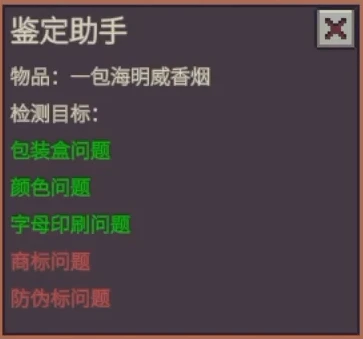
Inspection results with colored checks. - More Storage Colors (and themes) · DyrClone
Adds storage colors and category themes, making containers easier to tell apart.
1.1.0 · MelonLoader 0.7.xDetails
Color-code containers by what they hold. Capacity stays the same. - Convenience Module · maybeasd
Click to advance dialogue, automatically replace drained machine batteries and show water composition on hover.
1.6 · MelonLoaderDetails
Turn off automatic dialogue advance to click through lines. Use an AquaScan to see water composition on hover. The combined Files package is labelled 1.6.
Details
Use Restock on the customer tablet to move goods from selected storage. You still confirm each sale. Set stock areas for each save with the gear beside Restock.
Restock button on the customer tablet. - Exchange Preview · dbfox
Previews Underground Exchange trades and trash removal.
2.4.1 · 100-REV13 / REV16 betaDetails
After unlocking the Exchange, hover over the bin to see eligible trades and excess goods. Random rewards show a category only. Ordinary valuables left in the bin can still be lost. - Simple To-Do · dbfoxtw
Keep a floating task list, daily reminders and notes for each save.
2.2.0 · Full release 100-REV13; REV15 betaDetails
The author targets full-release 1.0, VERSION 100-REV13. Enable it in Mods and restart; no MelonLoader is needed. Daily tasks reset each in-game day. Lists are not synced by Steam Cloud: copy ModData/dbfoxtw_todo when moving PCs. Deleting a slot on Load Game deletes its list outright, without archiving it. The old demo 1.0.1 package does not work in the full game. Author release and save-data warnings · 2.2.0
Mod tools
Section titled “Mod tools”Details
Press F7 in the shop to plan modules against quality, performance or power limits. Applying moves actual items. Save first. Built for 100-Rev6. Installation, migration and recovery- Mod Manager · Nico
An in-game panel for mod toggles, hotkeys and supported settings, with Chinese/English UI.
1.2.9 · MelonLoaderDetails
Change hotkeys and enable or disable Melon mods from the panel. Restart after toggling DLLs. Installed-mod reporting is on by default and can be switched off.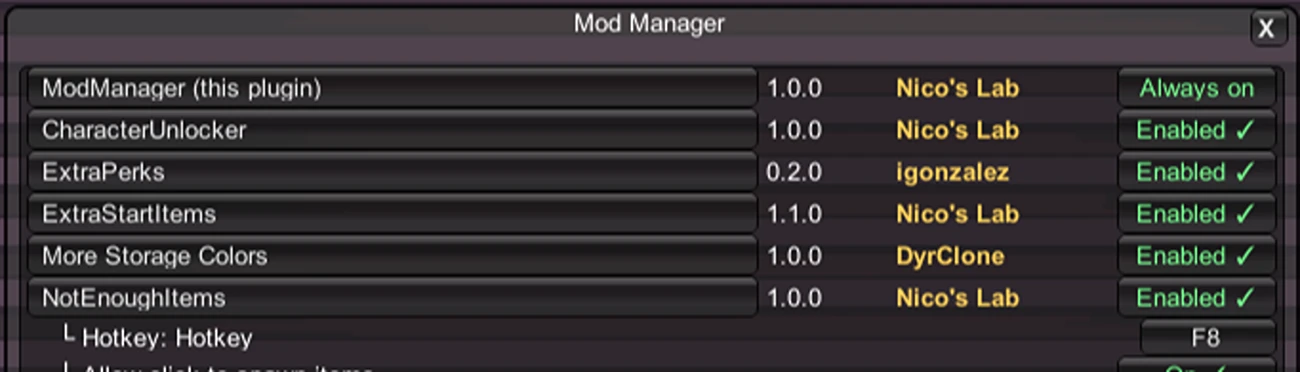
Mod toggles and hotkey settings.
Before installing
Section titled “Before installing”-
Match the game version and package format. Read the current author instructions; a new upload or endorsement count does not prove compatibility.
-
Back up your save and try one mod at a time on a separate run. Mods that add perks or enlarge containers can leave data in saves; do not assume removing a DLL restores the original save.
-
Use the package’s required loader. Real-Time Shop 2.0.0, Exchange Preview 2.4.1, QuickTrade 1.0.4 and Module Assembler 2.3.0 use the full game’s native Mods system. Do not install MelonLoader for these packages or load their old demo DLLs alongside them; other packages retain their own requirements.
If a mod appears inactive: check the loader and game-build requirements first. Apply configuration or hotkey edits in Mod Manager; enabling or disabling mod DLLs still requires a game restart. New starting perks need a new run. If an update causes problems, test one mod at a time on a separate save and keep the original backup intact.
October 31, 2026 · game 1.0.0.6: the developer warns that modding-security changes may break mods. Check each author’s support for your installed version before enabling a mod: a mod checked only on 100-Rev5 or earlier may not work on 100-Rev6. Steam
Known issues and older versions
These are Nexus Mods downloads, installed separately from Steam. At launch the developer warned that demo mods probably will not work with the full game (launch announcement).
- Container Upgrade 1.3.4: the author says animal-cage upgrades are not implemented yet (author reply).
- Module Assembler: review the transfer list before applying; a quick or unfinished search may not find the best layout. Backups cover saves already on disk, not unsaved progress, and removing the DLL does not undo layouts. The author says WaterCollector modules use an ID the planner cannot read, so inventory reading can fail with both installed (report). The optional diagnostic ZIP can include saves, logs and display details, so look through it before sharing it.
- More Features (demo): the author has acknowledged crashes when it runs alongside Ratlin, and results vary between players (author replies). Try it on its own with a save backup.
- Wage’s Perks + Wage Survival: Back up game saves and mod data before updating. Follow the author’s native-folder installation instructions and remove obsolete loose DLLs to avoid duplicate loading. Do not delete Mods/WagesPerks/: it contains saved mod progress. For the announced update, the author says users of Perks 1.4.1 or earlier must first remove the old DLL; 1.4.4 can be overwritten. This does not establish availability of a Perks 1.4.5 Nexus download.
- Exchange Preview: it only reminds you about items an exchange will take, excess items and last night’s returns (author reply). Other items in the bin get no warning, so do not store valuables there.
Sources and more mods
- Nexus Mods: Probably Stolen, sorted by endorsements — selection and popularity as of September 16, 2026; each table entry links its author’s details.
- Developer’s Steam reply about mod support — August 30, 2026.
- Nexus explanation of endorsements — what the counts mean.
- Official Probably Stolen Discord — the developer also points to an active modding community here.
- Inspector-assistant screenshot — kale98’s Nexus gallery.
- Mod Manager screenshot — Nico’s Nexus gallery.
- QuickTrade screenshot — kale98’s Nexus gallery.
- QuickTrade: Description / Files — kale98; checked October 27, 2026 (UTC). Main title “ProbablyStolenQuickTrade V0.5.4”, Version 0.5.4; page header and Description 0.5.3. The file note allows the Restock hotkey with the tablet closed, while Description still requires it open. Current game-build and save compatibility are unknown.
- Main cover: Probably Stolen by Questing Goose Studio and tinyBuild (official Steam page).
- Module Assembler: Description / Files / Posts reply 177317001 / report 1147324 — xiaolan0221; Description/Files rechecked October 15: 1.4.2 main upload and author-reported 16:10 window fix; October 11 v1.4.0 history and diagnostic ZIP privacy notes retained; October 12 conflict/promise followed by 1.4.1 file 969 and the author’s startup-crash fix claim, rechecked October 13. WaterCollector is now classified Not a bug; no compatibility or binary verification. October 23 source check: Files v1.5.0 (updated October 19), Demo 050rev5-L, named optional integration builds and pending full acceptance; author’s real-inventory and diagnostic-ZIP cautions remain relevant.
- Exchange Preview: Nexus Description / Files / author’s repository and changelog / author reply 177234027 — dbfox; source check October 23. Current Nexus Description and Files headers and the Files Version field show 1.0.2, uploaded October 19 for Demo 050REV5-L; the Description changelog still ends at 1.0.1. The author’s GitHub changelog reports a no-code-change check. Earlier October 9/11 page observations were 1.0.1/file 880.
Source details · 2026-10-31
October 31 source check: the main file is titled QuickTrade-1.0.1, but its separate Version field is blank. Keep one native copy, enable it in Mods and restart; remove the old demo copy. Back up first because Restock moves real stock.
QuickTrade · Files · Wage’s Perks · Wage Survival · Exchange Preview 2.0.1
Sources checked November 5, 2026; Appraisal Assistant rechecked November 10
WaGe’s Perks 1.4.3 · Files · Appraisal Assistant 1.1.0 · Files · More Features 1.9.20 · Exchange Preview 2.1.1 · Nexus · Files
Author notes and release history
- Wage’s Perks — Sources checked November 12, 2026: Nexus Files lists Wage’s Perks 1.4.4. The author reports fixes for Dice of Fate disappearing after loading, Wonder Box storage persistence and ineffective settings. Survival’s newer changelog announces Perks 1.4.5, but the checked Perks download is still 1.4.4; do not treat 1.4.5 as an available Nexus package.
- More Features Mod — Starting perks and shop/container changes, plus save management with backups and financial reports; Chinese/English UI. More Features 1.9.20 is listed in the page header and Files, uploaded October 19. It remains Demo-only. The author reports fixes for mod/save management and custom-skin windows, pause-menu entries, unbound-hotkey conflicts, input parsing and skin diagnostics. Full-release compatibility is unknown. Upgraded equipment in older saves may still appear at its initial level; no fix is claimed, so do not overwrite an affected save. Keep an external backup before updating, importing or removing the mod. Its backups omit other mods’ separate data; updating the DLL cannot repair a bad import. Custom perks remain in saves and may cause problems after uninstall.
- Container Upgrade — v1.3.4; requires MelonLoader 0.7.x. Machine upgrades and output boosts are off by default; experimental mod-container/machine detection is also off by default. Avoid similar machine-upgrade mods, restart after changing toggles, and back up before boosting modded-machine output. No exact demo-build confirmation found.
- ExtraPerks — v0.2.2, last updated August 25; requires MelonLoader. Start a new run to use the perks. Compatibility with the installed game is unknown.
- Wage Survival — Nexus Files lists Wage Survival 0.3.6, uploaded November 12, although its title still says “WageSurvival V0.3.5 20261111”. The author reports fixes for unwanted saving when exiting without settlement, combined-mod save/stat corruption, overnight/save freezes and panels persisting across saves or into the main menu. These source checks are not gameplay tests; compatibility with your installed game build remains unconfirmed.
- Real-Time Shop — Real-Time Shop 2.0.0 uses the built-in loader on Windows. The author recognizes full-game builds 26284217 / 100-Rev3 and 26274380 / 100-Rev1 by exact assembly hashes; unknown binaries disable the mod. MelonLoader and the old demo DLL are not used. As of October 31, compatibility with 1.0.0.6 / Rev6 is unknown. The documented Rev1/Rev3 builds remain the limit of the author’s support record. Player guide
- Appraisal Assistant — Appraisal Assistant 1.1.0 (formerly Inspector-assistant) is the author-listed version, updated November 9. Exact compatible game builds are not specified, and current-build behavior has not been independently tested. Earlier checks of 100-Rev4/Rev5 do not establish support for newer builds. “Fill and submit” is off by default: when enabled, clicking it submits the appraisal through the game’s normal flow. Leave it off if you only want to fill the value and review it before submitting.
- More Storage Colors (and themes) — v1.1.0; requires MelonLoader 0.7.x. Compatibility with the installed game is unknown. An appearance-focused option rather than a capacity upgrade.
- Convenience Module — The page header says v1.1, but the accessible Files tab lists the combined main package as v1.6, uploaded September 7. This is a historical label mismatch, not an October release. Requires MelonLoader. Water details need an AquaScan; click-to-advance needs automatic dialogue advancement off. Compatibility with the installed game is unknown.
- QuickTrade — Moves suitable stock from selected sources onto the counter; you review the goods and confirm each sale. QuickTrade 1.0.4 uses the full game’s native Mods system, without MelonLoader. It prepares stock; you still confirm every sale. The author reports fixes for restocking from containers inside an equipped backpack and returning rejected or over-budget goods to machine outputs. Exact current-build compatibility has not been independently tested. Author Description and Files checked November 3, 2026: both identify 1.0.4, uploaded November 2.
- Exchange Preview — 2.4.1. The author supports stable 100-REV13 and beta 100-REV16. From REV16, the preview follows the Janitorial Service’s protection of items in containers inside a
 Smuggler’s Bay (Modified); older builds keep their previous rules. This does not stop the Exchange from taking items. Since 2.1.1, updates add six UI languages, count stacked keycards correctly and let you move the trash-can note. Korean uses the English UI. Use the native Mods package, not MelonLoader. Back up first, replace the old native mod folder and preserve ModData. Reminders do not protect unrelated valuables; random rewards show categories only. GitHub 2.4.1
- Module Assembler — Plans layouts for 12 machine types with removable modules, including joint collector planning, quality/performance/power bounds and English/Chinese UI. Full-game 2.3.0 uses the official loader, not MelonLoader; the author’s checked baseline is game Build 26337366, not a guarantee for later builds. Demo 1.x remains separate. ModuleUpgrade merged effects are excluded; newer Proficiency and ProbablyOptimized compatibility fixes are not included. Applying moves real items: save normally and keep a separate backup. Installation, migration and recovery.
- Mod Manager — Current Nexus changelog labels v1.2.9 (Oct 22); it reports repaired settings ownership for localized, versioned DLL names. The Description still says v1.0.4 and lists Playtest, while the current Files version field is blank; match the author-labeled file and check its build before installing. DLL toggles still need a restart; no game-build compatibility claim is listed. Installed-mod reporting defaults ON; it can be switched off and covers only Melon Mods in Mods (including Disabled), excluding plugins, dependencies and outside files. The page explains name reporting, bilingual details/links and public aggregate stats. The author says opt-out cancels sync, deletes detail cache and clears displayed online details.
2026-11-12 · Wage’s Perks / Wage Survival
Back up game saves and mod data before updating. Follow the author’s native-folder installation instructions and remove obsolete loose DLLs to avoid duplicate loading. Do not delete Mods/WagesPerks/: it contains saved mod progress. For the announced update, the author says users of Perks 1.4.1 or earlier must first remove the old DLL; 1.4.4 can be overwritten. This does not establish availability of a Perks 1.4.5 Nexus download.
Simple To-Do 2.2.0 · installation and data
Choose Hide / show in Options → Key Binds to hide the whole list; collapse / expand remains the default. Version 2.2.0 fixes saving its position when hidden during a drag. Version 2.1.0 added Russian, German, Japanese, French, Spanish and Polish UI; Korean uses English.
Close the game before updating. Replace only Mods/dbfoxtw.todo with the new native folder, then enable it in Mods and restart. Keep ModData/dbfoxtw_todo: it contains your lists and settings. Do not install the old demo DLL. The author supports stable 100-REV13 and REV15 beta separately.
Unofficial fan wiki, not affiliated with Questing Goose Studio or tinyBuild. Game content belongs to its owners.
Traffic measurement
Anonymous page and tool counts help improve this wiki. Return-visit measurement is optional. Do Not Track and Global Privacy Control disable measurement.
Comments & feedback
Share a tip or suggest a correction. Comments are public. Guest names are unverified; verified accounts show their public name. All language pages share this discussion. Please keep personal information private.