 GameWikiStation
 Probably Stolen
Augs & the rogue AI

A sentient AI chip went rogue and took its hosts with it. These people, augs, look like everyone else until they  slip. Every faction agrees they should be shot on sight, and you keep a gun under the counter. Missing the signs costs you, and so does shooting the wrong person.
Try the customer identification practice and quiz.
Spotting an aug
Section titled “Spotting an aug”Watch how the customer moves, compare their outfit with their faction, and read the whole conversation. Use an  Aug Scanner to confirm a doubtful case. The in-game identification guide names five tells:
| Tell | What to check at the counter |
|---|---|
| Unnatural stillness | Watch the customer for a moment: are they unnaturally motionless? |
| Twitching | Look for jerky, twitching movement. A still picture cannot show either movement tell. |
| Outfit doesn’t match their faction | Compare the customer’s displayed identity with their clothing. Use the customer faction pages as a portrait reference. |
| Robotic vocabulary | Listen for language about units, subjects, allocated funds, replication or augmentation. |
| Overly formal phrasing | Watch for mechanical requests and awkward attempts to sound human. |
Don’t wait for all five signs. The demo can give disguised augs normal movement or ordinary dialogue, and some use normal faction portraits. A familiar face or a natural-sounding greeting does not clear the customer.
Portrait examples
Section titled “Portrait examples”These are verified examples from the game’s normal and aug portrait pools. Compare their eyes, faces and clothing. Each row compares a faction’s artwork, not a before-and-after transformation of the same person.
| Faction | Normal portrait pool | Aug portrait pool |
|---|---|---|
| Lower Levels |  |
 |
| Upper Levels |  |
 |
| Black Market | 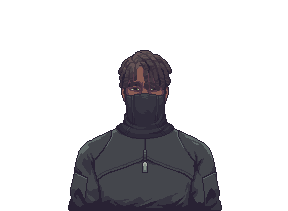 |
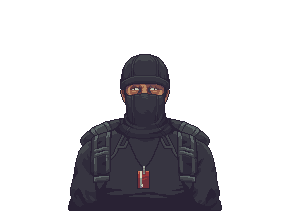 |
A normal-pool portrait does not prove the visitor is safe: disguised augs can use ordinary portraits. These still images cannot demonstrate unnatural stillness or twitching. Use the movement and dialogue checks above, or confirm with the scanner.
Dialogue examples
Section titled “Dialogue examples”These are actual English lines from the demo, not a list that every aug must say:
- A slip: “This unit has— I mean, I need some.”
- A budget clue: “Budget allocated: {0} credits.” The game replaces
{0}with the amount. - An augmentation clue: “A friend is preparing for the augmentation.”
- An obvious giveaway: “Initiating communication. I am a normal human.”
Other aug lines are as ordinary as “Picking them up for a friend.” Buying medicine or materials alone is not enough to identify one. Combine the conversation with the visual tells or a scan; don’t shoot an ordinary customer just for speaking formally.
Confirming with the Aug Scanner
Section titled “Confirming with the Aug Scanner”The Aug Scanner is available through Jackson’s workshop. Its item description promises 100% accuracy.
- Put a charged battery in the scanner’s battery slot. In demo build 049-Rev3-L, a scan needs 25 energy.
- Use the scanner while the suspected customer is at the counter.
- Read its result: “AUG DETECTED” or “No Aug detected”. “Ready to scan” is a ready state, not a negative result.
Read the result for the current customer before deciding. A frightened reaction to your gun is not a substitute: augs also have dialogue begging you not to shoot.
Aug or wanted criminal?
Section titled “Aug or wanted criminal?”| What you have identified | What to do |
|---|---|
| A confirmed aug | Use the gun under the counter.  The Mentor tells you to fire only when certain. The Mentor tells you to fire only when certain. |
| Someone on the wanted list | Press the alarm before they leave so Security can arrest them. Being wanted is not an aug tell. |
| A suspicious customer you haven’t confirmed | Keep checking the tells or use the scanner. Suspicion alone is not confirmation. |
Don’t call Security to deal with an aug. The Mentor warns that augs have access to Security’s communications; the follow-up officer dialogue describes the aug escaping. Shooting the wrong person can lead to a manslaughter investigation.
Missing augs
Section titled “Missing augs”Missed augs fill a meter. If it fills, you get the “Augmented” ending, a game over. Since patch 48.3.10 this ending only happens in Hard Mode.
Check your nightly reports: one message says a contact learned that an aug visited yesterday; another warns that Security expects one today. These are reminders to be alert, not identification of a particular face. Security can later announce that all augs have been eliminated and the gun is no longer needed.
Safety rails
Section titled “Safety rails”- Some essential recurring customers can’t be shot (48.3.10).
- Shooting an aug in Hard Mode no longer advances the meter by mistake (48.3.12).
- Shooting someone as they leave no longer softlocks the game (48.3.12).
Sources
Section titled “Sources”Identification checklist: the in-game Augmented Identification Guide. Dialogue examples, warnings and scanner details: the game’s Dialogue, Mechanic and Item localization tables, AugHelper, AugScanner and MiscItemDirectory, demo build 049-Rev3-L. Ending and safety changes: patch notes 48.3.10 and 48.3.12.
Unofficial fan wiki, not affiliated with Questing Goose Studio or tinyBuild. Game content belongs to its owners.
Traffic measurement
Anonymous page and tool counts help improve this wiki. Return-visit measurement is optional. Do Not Track and Global Privacy Control disable measurement.
Comments & feedback
Share a tip or suggest a correction. Comments appear publicly right away; display names are unverified. All language pages share this discussion. Please keep personal information private.